Word counter: what counts as a word
Last updated: 9 November 2026.
A word counter answers a question that sounds simpler than it is: what counts as a word? The answer on this site is a plain rule — a word is any run of characters separated by whitespace — and everything else the tool reports follows from equally plain rules about characters, lines and sentences. Once you know the rules, you also know why two counters can disagree on the same text, and which number to trust when a form, an editor or an exam has a limit. The counting runs entirely in your browser: nothing you paste is uploaded, and the result appears as soon as you click Convert.
How to count words
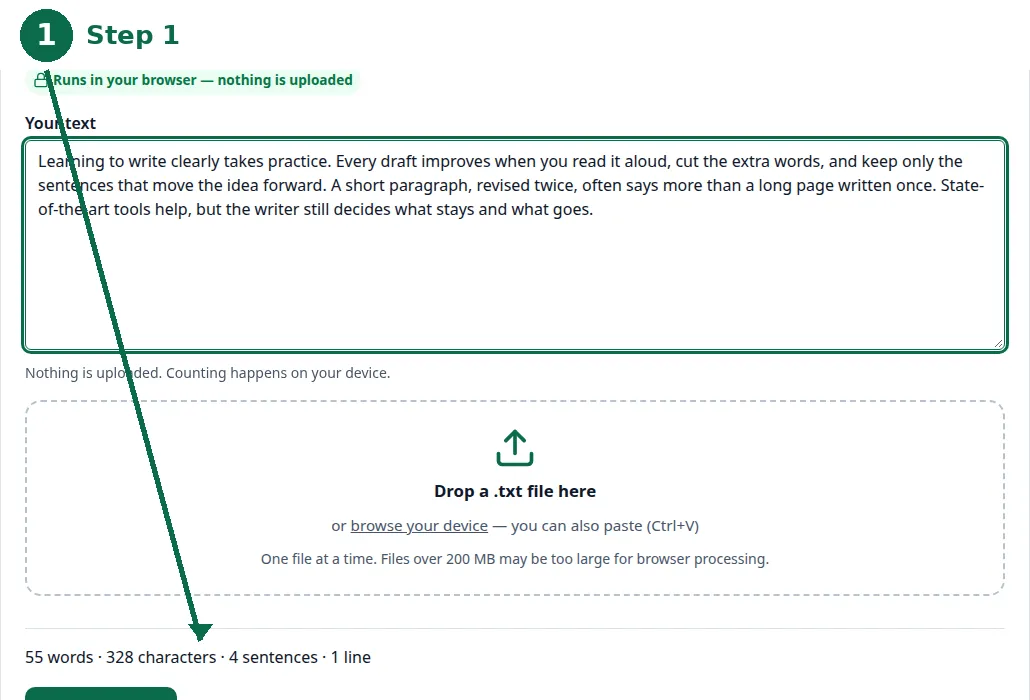
- Step 1 — Open the word counter and paste your text. Live counts appear as you type.
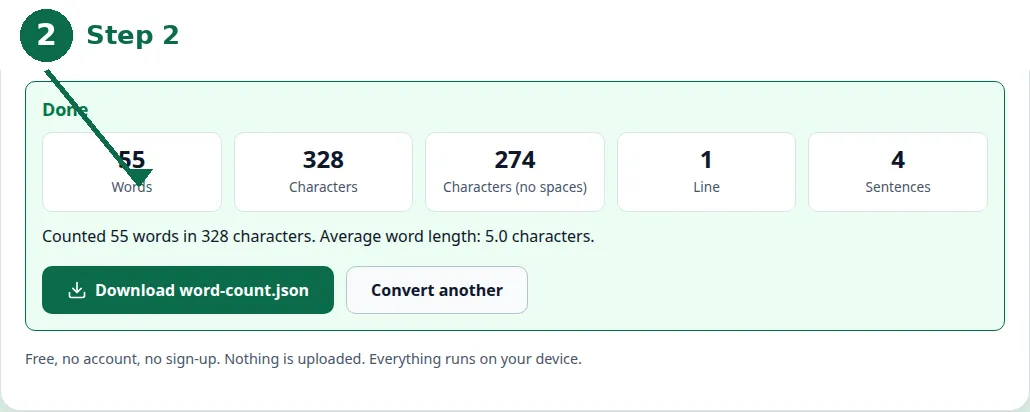
- Step 2 — Click Count Words and read all five counts: words, characters, characters without spaces, lines and sentences.
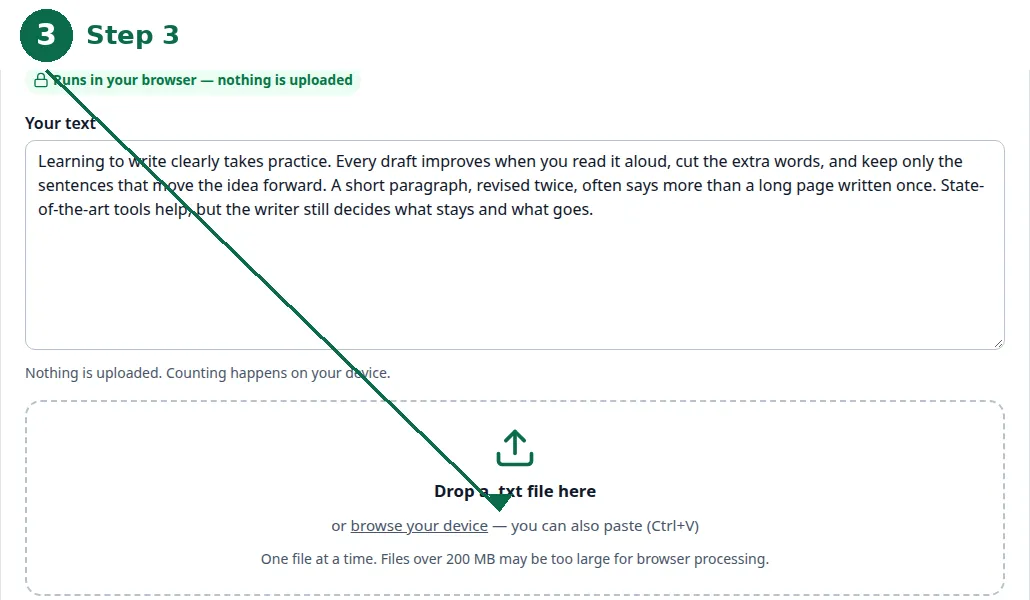
- Step 3 — To count a saved draft instead, drop a .txt file onto the page and its text is loaded into the box, then click Count Words.
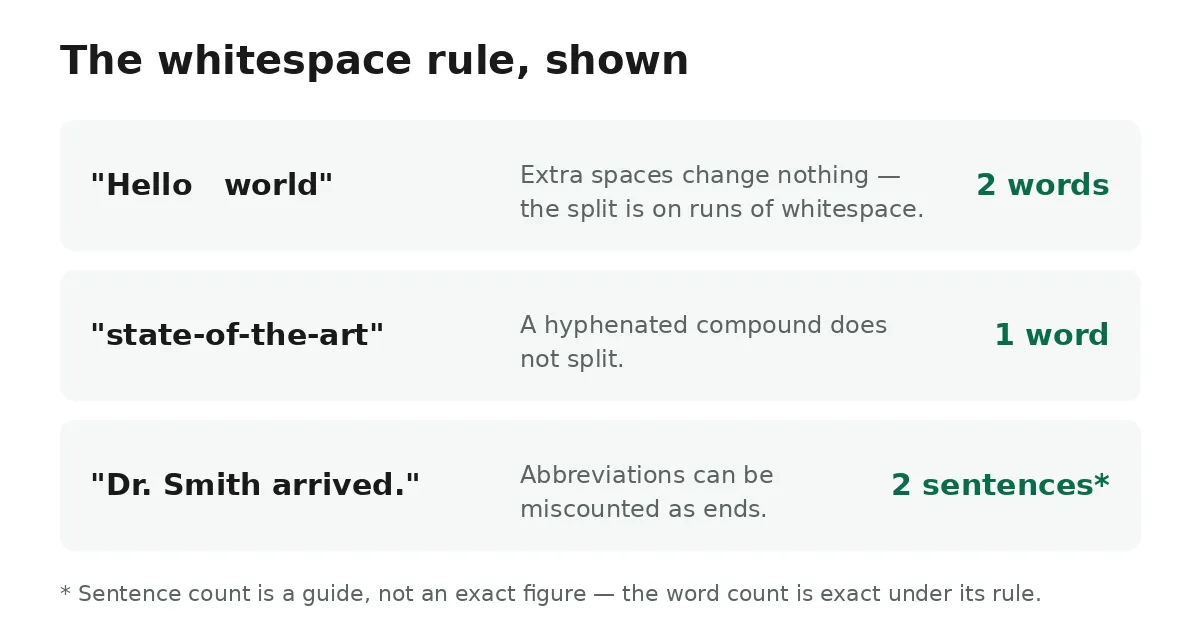
The one rule: whitespace separates words
Your text is split on whitespace. "Hello world" is 2 words, and a blank document is 0 words — extra spaces between words change nothing, because the split happens on runs of whitespace, not on single spaces. A word is whatever run of characters sits between spaces, tabs or line breaks, so "state-of-the-art" is one word, a hyphenated compound does not split, and a number on its own counts as a word exactly like any other token.
That simplicity is the point. A counter that tried to understand language — to decide that "don't" is one word but "well known" is two — would have to guess, and guesses differ from tool to tool. The whitespace rule does not guess: it is the same rule a text editor's status bar uses, and it is the rule this counter states on its own page, so the number you see is the number you can reproduce by hand. If a document's word count matters for a grade or a submission, use the tool whose rule you can state — and this is the rule.
| Count | Rule | Exact or guide |
|---|---|---|
| Words | Split on whitespace; a word is any run of characters between spaces, tabs or line breaks | Exact under its rule |
| Characters | Every letter, digit, punctuation mark and space | Exact under its rule |
| Characters (no spaces) | Letters and punctuation only | Exact under its rule |
| Lines | One per line break; an empty text has zero lines | Exact under its rule |
| Sentences | Runs of text ending in a full stop, exclamation mark or question mark | A guide — abbreviations can be miscounted |
Characters, with and without spaces
The counter reports characters two ways: with spaces and without spaces. Characters are counted with and without spaces because different limits ask for different figures — a form that caps a field at 500 characters usually means characters including spaces, while a submission system that asks for characters without spaces wants the letters and punctuation only. The tool gives you both, so you do not have to guess which one the limit means.
The character counter is the same idea turned into its own tool: it counts the characters in any text with and without spaces, and counts the lines too. A character is every letter, digit, punctuation mark and space in what you paste, so the count matches what a text editor's status bar would show. The figure without spaces is the one many forms and submission systems ask for, which is why it gets its own number rather than being left for you to work out.
Lines and sentences
Lines are counted per line break: a text with two line breaks has three lines, and an empty text has zero lines. That sounds trivial until a pasted document carries line breaks you did not intend — text copied from a PDF or a web page often arrives with a break at the end of every visual line, and each of those breaks counts. If your line count looks wrong, look for stray breaks first: they are almost always the cause, and removing them is the fix.
Sentences are runs of text ending in a full stop, exclamation mark or question mark. That rule is a heuristic, not a definition, and the tool page says so plainly: abbreviations such as "Dr." can be miscounted as sentence ends, so treat the sentence count as a guide rather than an exact figure. A text full of abbreviations, decimals or initials will over-count sentences, and a text with no full stops at all — a list, a heading, a fragment — will under-count them. The word and character counts are exact under their stated rules; the sentence count is an estimate, and it is labelled as one.
Why two counters disagree
Paste the same essay into two counters and you can get two different numbers, and the reason is almost always the rules, not a bug. One counter splits on whitespace and the other splits on spaces only, so extra spaces change the second count and not the first. One counts hyphenated compounds as one word and the other as two. One counts numbers as words and the other skips them. One strips the text's formatting first and the other counts the formatting characters as well. None of these is "wrong" in the abstract — each is a choice — but only a counter that states its rule lets you know which choice it made.
The same applies to the sentence count, only more so: because sentence counting is a heuristic, two tools with different heuristics will disagree on any text with abbreviations in it, and both can be honestly reporting their own rule. When a limit is enforced by a specific system — a university submission portal, a journal, an exam — the number that matters is the one that system produces, and the way to check it is to paste the same text into the counter you are using and read all five counts together, not just the headline word count. The result on this site can be downloaded as a JSON file with all five counts for your records, so the numbers you submit with are the numbers you can show afterwards.
Counting from a file, and counting long documents
You do not have to paste. Drop a .txt file onto the page and its text is loaded into the box, then click Convert — the same counts, the same rules. That is the way to count a draft you already have saved, and it is also the way to avoid retyping: the file's text is read in your browser, not uploaded, so a private document stays private either way.
The counter handles long documents the same way it handles short ones: the counts update for the whole text at once, however long it is. Use it to check essay lengths, trim social posts to a word limit, or measure a draft before you send it. For the limits themselves — how many words an essay, an application or a post should have — see the companion guide to word counts for essays, applications and social posts. Two practical habits make the numbers more useful. First, count the final text, not an early draft — a count taken before editing is a count of words you may delete. Second, when a limit is tight, check the characters without spaces as well as the words: a limit stated in words and a limit stated in characters bite differently, and the tool reports both so you can satisfy whichever one applies.
One more caution, and it applies to both counters: the tool counts plain text only. Formatting from a document is not preserved when you paste, so bold, italics and headings arrive as plain words, and the line count follows line breaks in the pasted text. If you paste from a word processor, paste as plain text where your editor allows it — the count will be cleaner, and the line breaks will be yours rather than the document's.
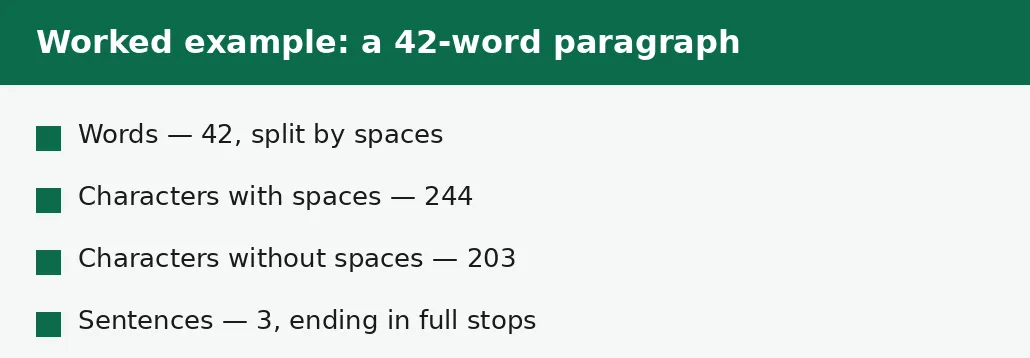
Worked example: counting a 42-word paragraph
Take this paragraph: "Learning to write clearly takes practice. Every draft improves when you read it aloud, cut the extra words, and keep only the sentences that move the idea forward. A short paragraph, revised twice, often says more than a long page written once." Paste it into the counter and the five counts come back together: 42 words, 244 characters with spaces, 203 characters without spaces, 3 sentences, 1 line. The words are the runs of characters split by spaces — 42 of them. The characters with spaces count every letter, space and full stop — 244. Without spaces, the 41 spaces drop out and the count is 203. The sentences are the runs ending in a full stop — 3. And the lines are 1, because the text was pasted as a single block with no line breaks.
The example shows why the counts disagree with other tools. A counter that splits on hyphens would count "revised twice" the same way but might split a hyphenated word into two. A counter that counts sentences by full stops would count "Dr. Ahmed wrote the report. It was 200 words long, more or less." as 3 sentences, because "Dr." carries a full stop that is not a sentence end — the text has 2 sentences and 13 words, but a naive counter reports 3 sentences. When a limit is enforced by a specific system, the number that matters is the one that system produces: paste the same text into the counter you are using, read all five counts together, and submit the number the system itself would report.
Troubleshooting
Why does my line count look wrong?
Text copied from a PDF or a web page often arrives with a break at the end of every visual line, and each of those breaks counts. Look for stray breaks first: they are almost always the cause, and removing them is the fix.
Why does another counter give a different number?
The reason is almost always the rules, not a bug: one counter splits on whitespace and the other on spaces only, one counts hyphenated compounds as one word and the other as two, one counts numbers as words and the other skips them. Only a counter that states its rule lets you know which choice it made — and when a limit is enforced by a specific system, the number that matters is the one that system produces.
Common questions
How are words counted?
Your text is split on whitespace. "Hello world" is 2 words, and a blank document is 0 words. A word is any run of characters separated by whitespace, so hyphenated compounds count as one word.
Does the count include spaces?
The characters count includes spaces, and the tool also reports characters without spaces — the figure many forms ask for. The word count itself is unaffected by how many spaces sit between words.
How are lines counted?
One per line break. A text with two line breaks has three lines, and an empty text has zero lines. Text copied from a PDF or a web page often arrives with extra breaks, and each of those counts.
How are sentences counted?
Sentences are runs of text ending in a full stop, exclamation mark or question mark. It is a heuristic: abbreviations such as "Dr." can be miscounted as sentence ends, so treat the sentence count as a guide rather than an exact figure.
Can I count words in a file?
Yes — drop a .txt file onto the page and its text is loaded into the box, then click Convert. The file is read in your browser, not uploaded.
Is my text uploaded anywhere?
No. The counting code runs on your device; nothing is sent to any server. Drafts, essays and private documents stay private.
Word counter or character counter — which one do I need?
Use the word counter when the limit is in words — essays, articles, posts. Use the character counter when the limit is in characters — form fields, bios, captions. Both report characters with and without spaces, and both run entirely in your browser.
Summary
A word is whatever sits between whitespace, so the count is exact once the rule is known — and that rule is also why two counters can honestly disagree. Read all five counts together when a limit applies, remember the sentence count is a guide, and count the final text, not an early draft. Nothing you paste leaves your device.