MP3 vs WAV: which audio format should you use?
Last updated: 9 November 2026.
Use MP3 when the file needs to be small or play anywhere — sharing, phones, websites, podcasts. Use WAV when quality matters most and size does not — editing, mixing, archiving a recording. MP3 shrinks an audio file to about a tenth of its WAV size by throwing away sound detail you are unlikely to hear; WAV keeps every detail and is about ten times bigger. Converting WAV to MP3 is a one-way step: the detail thrown away cannot be recovered by converting back.
What MP3 and WAV actually are
WAV is sound stored exactly as it was recorded: every sample of the original waveform, with nothing thrown away. A CD-quality WAV records sound 44,100 times a second at 16 bits per sample, in stereo — which works out at about 10 MB for every minute of audio. That is why a WAV file is big, and why it sounds exactly like the recording: nothing has been removed.
MP3 is the same sound with the inaudible parts removed. It analyses the audio and discards detail the ear is unlikely to notice — very quiet sounds masked by louder ones, frequencies at the edge of hearing — and stores what is left far more efficiently. At 128 kilobits per second, a minute of MP3 takes about 1 MB, roughly a tenth of the WAV. At 320 kilobits per second, the highest common MP3 setting, it takes about 2.4 MB a minute and is very hard to tell from the original on ordinary speakers or headphones.
How to convert between MP3 and WAV
Converting either way takes the same three steps: choose the file, convert, download the result. The direction is what matters, not the method — and the direction is decided by what the file is for next, not by which format sounds better in the abstract. A file headed for a phone wants MP3; a file headed for an audio editor wants WAV.
Before you convert, check whether you still have the original. Converting a WAV to MP3 and then back to WAV gives you a WAV that sounds like the MP3 — the detail thrown away in the middle step is gone for good. If the WAV still exists, convert from that; if it does not, accept the MP3 as the best version you have and convert only if a tool or device insists on WAV.
- Step 1 — Open the MP3 to WAV tool and choose your MP3 file.
- Step 2 — Click Convert and wait for the conversion to finish — a long file takes a little longer.
- Step 3 — Download the WAV file and check it plays before you delete the original.
- Step 4 — If you need the smaller file instead, convert the other way: WAV to MP3 shrinks the file to about a tenth of its size.
File sizes: the numbers that decide it
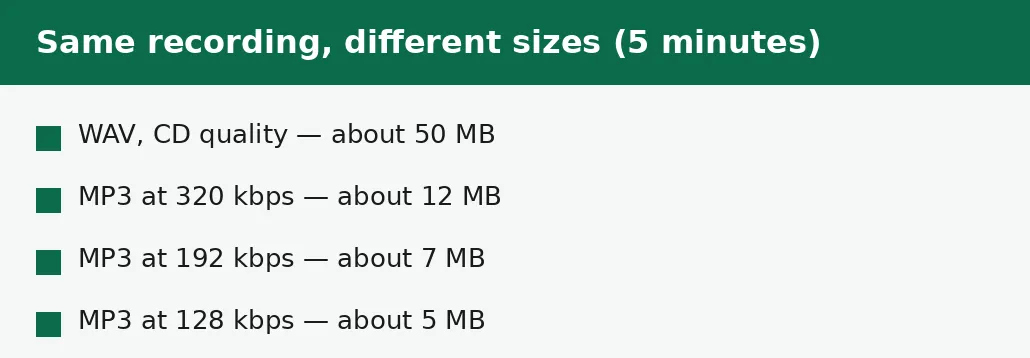
Size is the whole argument for MP3. A 5-minute recording as a CD-quality WAV is about 50 MB — too big to attach to most emails, slow to upload on a weak connection, and a noticeable chunk of a phone's storage after a dozen songs. The same 5 minutes as a 128 kbps MP3 is about 5 MB: it attaches, uploads and stores without a second thought.
The middle settings are where most people should live. At 192 kbps an MP3 is about 7 MB for 5 minutes and sounds good on any normal playback; at 320 kbps it is about 12 MB and is close enough to the original that most listeners cannot tell them apart in a blind test. Below 128 kbps the savings get small and the damage gets audible — thin cymbals, a smeared stereo image, a voice that sounds slightly underwater — so 128 kbps is a sensible floor for music, and 192 kbps is the safer choice when the file will be listened to closely.
| MP3 | WAV | |
|---|---|---|
| Size (5 minutes) | About 5 MB at 128 kbps | About 50 MB |
| Sound quality | Very good; detail removed | Full; nothing removed |
| Plays on | Nearly everything | Nearly everything |
| Best for editing | No — already compressed | Yes — full detail kept |
| Best for sharing | Yes — small and universal | No — too big to send |
| Convert back? | Loses quality permanently | No gain from MP3 |
Which way to convert — and when not to
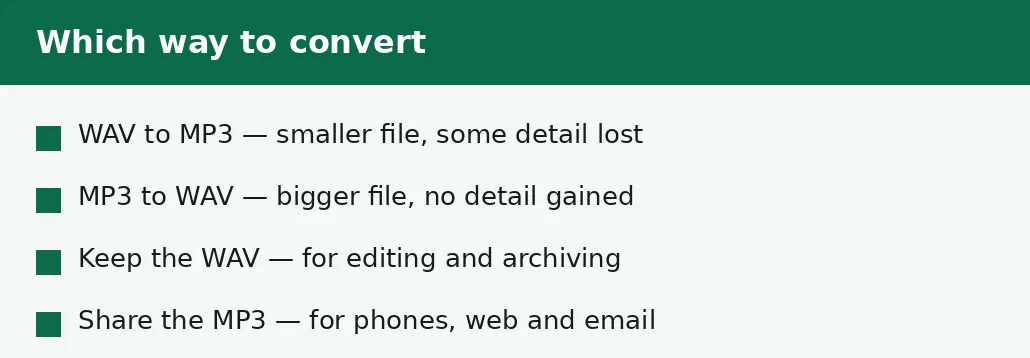
WAV to MP3 is the common direction, and it is the one that makes sense: the file gets ten times smaller, the quality loss at 192 kbps or above is small, and the result plays on anything. Do it when the file needs to be sent, stored on a phone, put on a website, or attached to an email. Keep the WAV as the master copy if you might ever edit the recording again.
MP3 to WAV is the rarer direction, and it only makes sense when something else demands a WAV: an older audio editor, a piece of hardware, a podcast host or a game engine that accepts only WAV. The conversion itself is honest — the WAV will contain exactly the sound the MP3 had, no better and no worse — but the file will be about ten times bigger for no audible gain. Never convert MP3 to WAV hoping to improve the sound: the detail was discarded when the MP3 was made, and no conversion can put it back.
Quality: what you actually hear
On ordinary playback — phone speakers, earbuds on a bus, a laptop — a 192 kbps MP3 and the original WAV are effectively indistinguishable for most listeners. The differences live at the edges: quiet passages where the encoder had to choose what to keep, high frequencies on good headphones, and repeated editing, where each MP3 save throws away a little more. That last point is the real reason editors insist on WAV: every time an MP3 is re-saved, it loses a little more detail, so a file edited five times as MP3 sounds worse than one edited five times as WAV.
Bitrate is the number that controls the trade-off. A higher bitrate keeps more detail and makes a bigger file; a lower bitrate saves space and costs detail. For spoken word, 96 to 128 kbps is usually plenty, because voices are simpler than music. For music, 192 kbps is the practical sweet spot and 320 kbps is the cautious one. And for anything you will edit, mix or archive, skip the trade-off entirely and keep the WAV.
The mistakes that cost quality
The most common mistake is converting MP3 to MP3: taking a 128 kbps MP3, converting it again at a different bitrate, and wondering why it sounds worse. Every MP3 conversion throws away detail, so a second conversion throws away detail from an already-reduced file. Convert once, from the best version you have — the WAV, or the highest-bitrate MP3 — and stop.
The second mistake is deleting the WAV after converting to MP3. The MP3 is a copy for sharing, not a replacement for the master: if you later want to edit the recording, remix it or convert it at a higher bitrate, only the WAV can do that. Keep the WAV somewhere safe — an external drive, a cloud folder — and treat the MP3 as the disposable copy. The third mistake is choosing the wrong direction for the job: sending a 50 MB WAV by email when a 5 MB MP3 would have done, or editing an MP3 when the WAV was sitting in the same folder.
Troubleshooting
Why is my WAV file so big?
WAV stores every sample of the original sound with nothing removed — about 10 MB per minute at CD quality. That is normal, not a fault. If the file needs to be sent or stored on a phone, convert it to MP3, which shrinks it to about a tenth of the size.
Why does my converted MP3 sound worse than the WAV?
MP3 removes detail the ear is unlikely to hear, and at low bitrates the removal becomes audible — thin cymbals, a smeared stereo image. Convert at 192 kbps or higher for music, and always convert from the WAV, never from another MP3.
Why is my WAV converted from MP3 so much bigger, with no better sound?
Converting MP3 to WAV only changes the container: the WAV holds exactly the sound the MP3 had, at WAV's full size. The detail discarded when the MP3 was made cannot be recovered. Only convert to WAV when a tool or device insists on it.
Common questions
Is MP3 or WAV better quality?
WAV is better quality because it keeps every detail of the original recording. MP3 at 192 kbps or above sounds very close on ordinary playback, but it has thrown away detail that cannot be recovered.
Can I convert MP3 to WAV without losing quality?
Yes — converting MP3 to WAV loses nothing further, because the WAV simply holds the MP3's sound at full size. But it gains nothing either: the detail discarded when the MP3 was made is gone for good.
What bitrate should I use for MP3?
192 kbps is the practical sweet spot for music, 320 kbps is the cautious choice, and 128 kbps is a sensible floor. For spoken word, 96 to 128 kbps is usually plenty.
Will a WAV file play on my phone?
Yes, most phones and players open WAV files — but a WAV is about ten times the size of an equivalent MP3, so it fills storage fast. MP3 is the better choice for listening on a phone.
Is my audio uploaded anywhere when I convert it?
No. Conversion runs entirely in your browser. Nothing is sent to a server, there is no account, and closing the tab clears your file from memory.
Should I keep the WAV after converting to MP3?
Yes, if you might ever edit the recording again. The MP3 is a copy for sharing; the WAV is the master. Once the WAV is deleted, no higher-quality version can ever be made from the MP3.
Summary
MP3 is small and universal — about a tenth the size of WAV — and is the right format for sharing, phones and the web. WAV keeps every detail and is the right format for editing, mixing and archiving. Convert WAV to MP3 to shrink a file, convert MP3 to WAV only when a tool demands it, and never delete the WAV if you might edit the recording again.